RAM memory: the volatile workspace of the computer
There is a component in the computer that largely determines how smoothly we can work. It is not seen, it is not touched, and it rarely receives the attention it deserves until the system starts to slow down or an application crashes unexpectedly. That piece is RAM.
RAM (Random Access Memory) is the temporary workspace where the processor stores the data and instructions it is currently using. Unlike permanent storage, such as a hard drive or SSD, RAM is volatile: its contents are lost when the computer is turned off. That volatility is not a defect but a characteristic that makes it extremely fast. The processor can read from and write to RAM in nanoseconds, while accessing permanent storage involves latencies hundreds of times greater.
Without RAM, the processor would have to fetch every piece of data directly from the disk, which would make any operation, from opening a browser to compiling code, unbearably slow. RAM is the bridge between the processor's speed and the slowness of storage. It is, in essence, the computer's workbench.
This article examines RAM from its origins to the most recent innovations. We will begin with the Williams Tube, used in the Manchester Baby experimental computer in 1948, and then examine the internal components of a modern RAM module. Next, we will explore the evolution of RAM generations, the most recent innovations, and how a module can manage volatile information. Finally, we will present a comparative table and a poll for readers to choose the most iconic RAM generation.
1. The origin: the Williams Tube and the Manchester Baby (1948)
Before silicon chips existed, computers stored information in ways that now seem ingenious but fragile. One of the first random-access memories was the Williams Tube, also known as the Williams-Kilburn Tube, developed by Frederic Calland Williams and Tom Kilburn at the University of Manchester in the late 1940s.
The operating principle was as simple as it was brilliant. The Williams Tube was a modified cathode ray tube (CRT). An electron beam was fired at a phosphorescent screen inside the tube. The points where the beam hit became electrically charged, functioning as tiny capacitors. A charged point represented a binary 1; an uncharged point represented a 0. The information was read by detecting the presence or absence of that charge using a metal plate outside the tube (Dunn, 2026; IEEE, 2021).
The Manchester Baby computer (Small-Scale Experimental Machine, SSEM) was built specifically to test the Williams Tube. On June 21, 1948, the Baby became the first computer to run a program stored in an electronic random-access read-write memory (IEEE, 2021). The program was simple, a test calculation, but it proved that tube memory could work. The Baby had a memory of only 32 words of 32 bits each, but it was the starting point of a revolution.
The Williams Tube had severe limitations. It was volatile, needed constant refreshing, and was prone to errors from charge accumulation on the screen. But it demonstrated that random-access memory was possible, and it paved the way for the technologies that would follow.
2. Anatomy of a modern RAM module
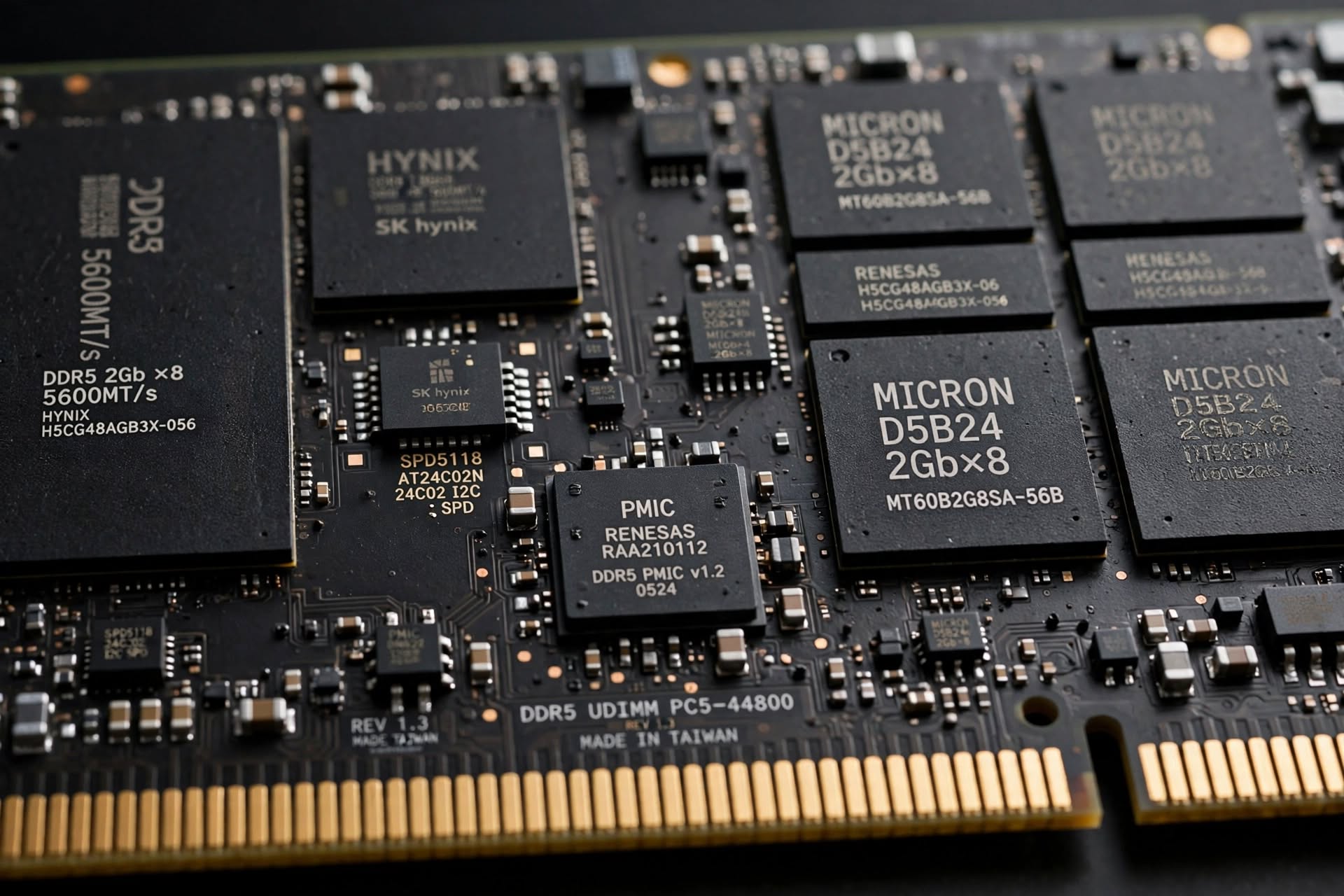
A modern RAM module, such as those inserted into the DIMM slots of a motherboard, is a surprisingly complex piece of engineering. At first glance, it looks like a simple card with black chips. But inside that card are several components working together so that the processor can read and write data at speeds of billions of operations per second.
2.1. DRAM memory chips
The heart of a RAM module is the DRAM (Dynamic Random Access Memory) chips. Each chip contains millions of memory cells, and each cell is made up of a transistor and a capacitor. The transistor acts as a switch that allows or blocks access to the capacitor, and the capacitor stores an electrical charge representing a bit: charged for a 1, discharged for a 0 (Dunn, 2026).
The word "dynamic" is because the capacitor loses its charge over time. To prevent data loss, DRAM must be periodically refreshed. Refreshing consists of reading each cell and writing the same value back, restoring the capacitor's charge. This process is performed every few milliseconds and is managed automatically by the memory controller.
2.2. The SPD chip (Serial Presence Detect)
The SPD is a small EEPROM (electrically erasable programmable read-only memory) chip that stores information about the module: its capacity, speed, latencies, voltage, and timings. When the computer boots, the system reads the SPD to automatically configure the memory parameters without manual intervention (Kingston, 2026).
2.3. The PMIC (Power Management Integrated Circuit)
In DDR5 modules, the PMIC is a new and crucial component. It regulates the voltage received by each component of the module: the DRAM chips, the register (in RDIMM modules), the SPD, and the PMIC itself. Before DDR5, voltage regulation was performed on the motherboard; with DDR5, it moved to the module to improve efficiency and reduce electrical noise (Kingston, 2026).
2.4. The CKD (Client Clock Driver) in CUDIMM
CUDIMM (Clocked Unbuffered DIMM) modules incorporate a Client Clock Driver (CKD), a chip that regenerates the clock signal within the module. This improves signal integrity at high speeds, allowing DDR5 modules to reach higher frequencies stably (ATP Inc., 2026).
2.5. The PCB and contacts
The PCB (Printed Circuit Board) is the physical base of the module. It contains the copper traces that connect the DRAM chips to the gold contacts on the bottom edge, which are inserted into the motherboard's DIMM slot. The PCB design is critical for signal integrity, especially in the faster generations of DDR5.
Diagram of a DDR5 RAM module
flowchart TD
    subgraph Module["DDR5 Module"]
        SPD["SPD Chip\n(EEPROM)"]
        PMIC["PMIC\n(Voltage regulation)"]
        CKD["CKD\n(Clock regeneration)"]

        subgraph Chips["DRAM Chips"]
            C1["DRAM 1"]
            C2["DRAM 2"]
            C3["DRAM 3"]
            C4["DRAM 4"]
        end

        PCB["PCB\n(Copper traces and contacts)"]
    end

    SPD -->|"Configuration"| PMIC
    PMIC -->|"Regulated voltage"| Chips
    CKD -->|"Regenerated clock"| Chips
    Chips --> PCB

    style Module fill:#e3f2fd,stroke:#1565c0
    style Chips fill:#e8f5e9,stroke:#2e7d32
    style PMIC fill:#fff3e0,stroke:#ef6c00
3. Evolution of RAM generations
The evolution of RAM has been a constant race to increase speed, reduce consumption, and improve efficiency. From the Intel 1103 to DDR5, each generation has brought significant improvements.
3.1. Intel 1103 (1970): the first commercial DRAM
The Intel 1103, launched in October 1970, was the first commercially available DRAM chip. It had a capacity of 1 kilobit (1,024 bits) and used a three-transistor, one-capacitor (3T1C) memory cell. Its cycle time was 580 ns and its access time was 300 ns. Although its early production had low yields, by the end of 1971 it had become the best-selling semiconductor device in the world (Intel, 1970; Nature Electronics, 2018).
3.2. SDRAM (1993): synchronous memory
SDRAM (Synchronous Dynamic RAM) synchronized memory with the system clock, allowing read and write operations to be coordinated with the processor. The initial standard was PC66, with a clock frequency of 66 MHz and a bandwidth of 533 MB/s. Later came PC100 and PC133, with 800 MB/s and 1,067 MB/s respectively (e-Words, 2026).
3.3. DDR SDRAM (2000): double data rate
DDR SDRAM (Double Data Rate) doubled the transfer rate by performing two transfers per clock cycle, one on the rising edge and one on the falling edge. The initial standard was PC1600, with a bandwidth of 1.6 GB/s. It was followed by PC2100 (2.1 GB/s) and subsequent generations: DDR2, DDR3, and DDR4, each with lower voltages and higher speeds (EE Times, 1999).
3.4. DDR5 and beyond (2021 - present)
DDR5 introduced significant architectural changes: two 32-bit subchannels per module, an integrated PMIC, and a reduced voltage of 1.1V. Speeds reach 6,400 MT/s in standard configurations, and enthusiast modules exceed 8,000 MT/s. In 2026, innovations focus on CUDIMM (with CKD to improve signal integrity) and MRDIMM (Multiplexed Rank DIMM), which doubles bandwidth per channel by running two ranks simultaneously, reaching 8,800 MT/s and 70.4 GB/s per channel in its first generation (ATP Inc., 2026; JEDEC, 2026).
Comparative table of RAM generations
| Generation | Year | Frequency (MHz) | Bandwidth (MB/s) | Voltage (V) | Typical capacity |
|---|---|---|---|---|---|
| Intel 1103 | 1970 | 0.5 | 0.0005 | 16 | 1 Kbit |
| SDRAM PC66 | 1993 | 66 | 533 | 3.3 | 16 MB |
| DDR PC1600 | 2000 | 100 (x2) | 1,600 | 2.5 | 256 MB |
| DDR2 PC2-5300 | 2003 | 333 (x2) | 5,300 | 1.8 | 1 GB |
| DDR3 PC3-12800 | 2007 | 800 (x4) | 12,800 | 1.5 | 4 GB |
| DDR4 PC4-25600 | 2014 | 1,600 (x8) | 25,600 | 1.2 | 16 GB |
| DDR5 PC5-51200 | 2021 | 3,200 (x16) | 51,200 | 1.1 | 32 GB |
| MRDIMM Gen1 | 2026 | 4,400 (x16) | 70,400 | 1.1 | 64 GB+ |
4. How is volatile information managed?
RAM is volatile because each memory cell is, in essence, a capacitor that discharges over time. For information not to be lost, DRAM must be constantly refreshed.
4.1. The refresh cycle
Refreshing consists of reading the value of each cell and writing the same value back, restoring the capacitor's charge. This process is performed every 64 milliseconds (typically) for all memory rows. The memory controller generates the necessary signals for refreshing automatically, without processor intervention (Dunn, 2026).
flowchart LR
    A["DRAM cell\n(charged capacitor)"] --> B["Gradual charge\nloss"]
    B --> C["Risk of\ndata loss"]
    C --> D["Refresh\n(read + rewrite)"]
    D --> E["Charge restored"]
    E --> A

    style D fill:#fff3e0,stroke:#ef6c00
4.2. Refresh modes
There are two main refresh modes:
- Auto-refresh: the memory controller sends periodic refresh commands to the module. This is the mode used during normal operation.
- Self-refresh: the module itself generates refreshes autonomously, allowing the memory controller to enter a low-power state. It is used in suspend and power-saving modes (Dunn, 2026).
4.3. Data organization
In addition to refreshing, RAM organizes data into banks, rows, and columns. When the processor requests a piece of data, the memory controller activates the corresponding row (which is loaded into a row buffer), and then selects the column. This sequential access within the same row is much faster than accessing different rows, which explains why RAM performance depends on localized access patterns.
5. The greatest invention in RAM: CUDIMM and MRDIMM
If there is one innovation that is making a difference in 2026 RAM, it is the combination of CUDIMM and MRDIMM.
5.1. CUDIMM: the regenerated clock
CUDIMM (Clocked Unbuffered DIMM) modules incorporate a Client Clock Driver (CKD) that regenerates the clock signal within the module. In previous generations, the clock signal traveled from the motherboard to the module, and at high frequencies it degraded. With the CKD, the signal is regenerated locally, improving integrity and allowing higher speeds stably. This is especially important for DDR5 modules that exceed 6,400 MT/s (ATP Inc., 2026).
5.2. MRDIMM: double the bandwidth
MRDIMM (Multiplexed Rank DIMM) goes one step further. Instead of running a single rank at a time, MRDIMM multiplexes two ranks, doubling the bandwidth per channel. An MRDIMM Gen1 at 8,800 MT/s delivers approximately 70.4 GB/s per channel, compared to 51.2 GB/s for a DDR5-6400 RDIMM. This technology is aimed at AI and HPC servers, where memory bandwidth is a critical bottleneck (ATP Inc., 2026; JEDEC, 2026).
flowchart TD
    subgraph CUDIMM["CUDIMM"]
        MB1["Motherboard"] -->|"Clock"| CKD1["CKD"]
        CKD1 -->|"Regenerated clock"| DRAM1["DRAM"]
    end

    subgraph MRDIMM["MRDIMM"]
        MB2["Motherboard"] -->|"Commands"| MUX["Multiplexer"]
        MUX -->|"Rank 0"| R0["Rank 0"]
        MUX -->|"Rank 1"| R1["Rank 1"]
        R0 -->|"Data"| BUS["Data bus"]
        R1 -->|"Data"| BUS
    end

    style CKD1 fill:#e8f5e9,stroke:#2e7d32
    style MUX fill:#fff3e0,stroke:#ef6c00
6. Poll: which RAM generation is the most iconic?
Throughout history, each RAM generation has marked a milestone. From the Intel 1103, which proved that DRAM was viable, to the enthusiast modules from Corsair and G.Skill that defined modern overclocking.
7. Conclusion
RAM has come a long way since the Williams Tube of 1948. What began as a cathode ray tube with 32 words of memory has transformed into modules of tens of gigabytes operating at speeds of tens of thousands of megabytes per second. RAM is, without a doubt, one of the most critical components of the modern computer. It determines system fluidity, the ability to run demanding applications, and the speed at which the processor can access data.
The innovations of 2026, such as CUDIMM and MRDIMM, demonstrate that RAM evolution has not stopped. The demand for bandwidth for AI and HPC applications is driving the development of technologies that a decade ago seemed impossible. And at the center of it all, the same fundamental principle remains: storing bits in microscopic capacitors and refreshing them thousands of times per second so that information is not lost.
8. References
ATP Inc. (2026, July 28). Understanding RAM and DRAM computer memory types. https://www.atpinc.com
Dunn, K. (2026). The remote island where hackers prepare to defend us from an invisible war. BBC Future. https://www.bbc.com/mundo/articles/cj4jqnd0vnro
EE Times. (1999, August 31). Hyundai samples 128-Mbit DDR SDRAM. https://www.eetimes.com
e-Words. (2026). SDRAM (Synchronous DRAM) definition. https://e-words.jp
IEEE. (2021, October 29). Milestones: The Manchester University 'Baby' computer. IEEE ETHW. https://ieeemilestones.ethw.org
Intel. (1970). Intel 1103 1K-bit dynamic random access memory [Product specification]. Intel Corporation.
JEDEC. (2026). DDR5 MRDIMM Gen 2 standard. JEDEC Solid State Technology Association.
Kingston Technology. (2026). DDR5 memory module components: PMIC, SPD, and CKD. https://www.kingston.com
Nature Electronics. (2018, June 13). Memory lane. Nature Electronics, 1(6), 323. https://doi.org/10.1038/s41928-018-0089-4
Loading reactions...
Comments (0)
Loading session...
No comments yet. Be the first to comment.