The Motherboard: The Nervous System of the Computer
Topics
In the world of hardware, there is a component that, while lacking the glamour of a cutting-edge processor or the spectacle of a graphics card, is the true pillar upon which the entire system rests. Without it, the most powerful components in the world are just pieces of inert silicon waiting to be connected. That piece is the motherboard.
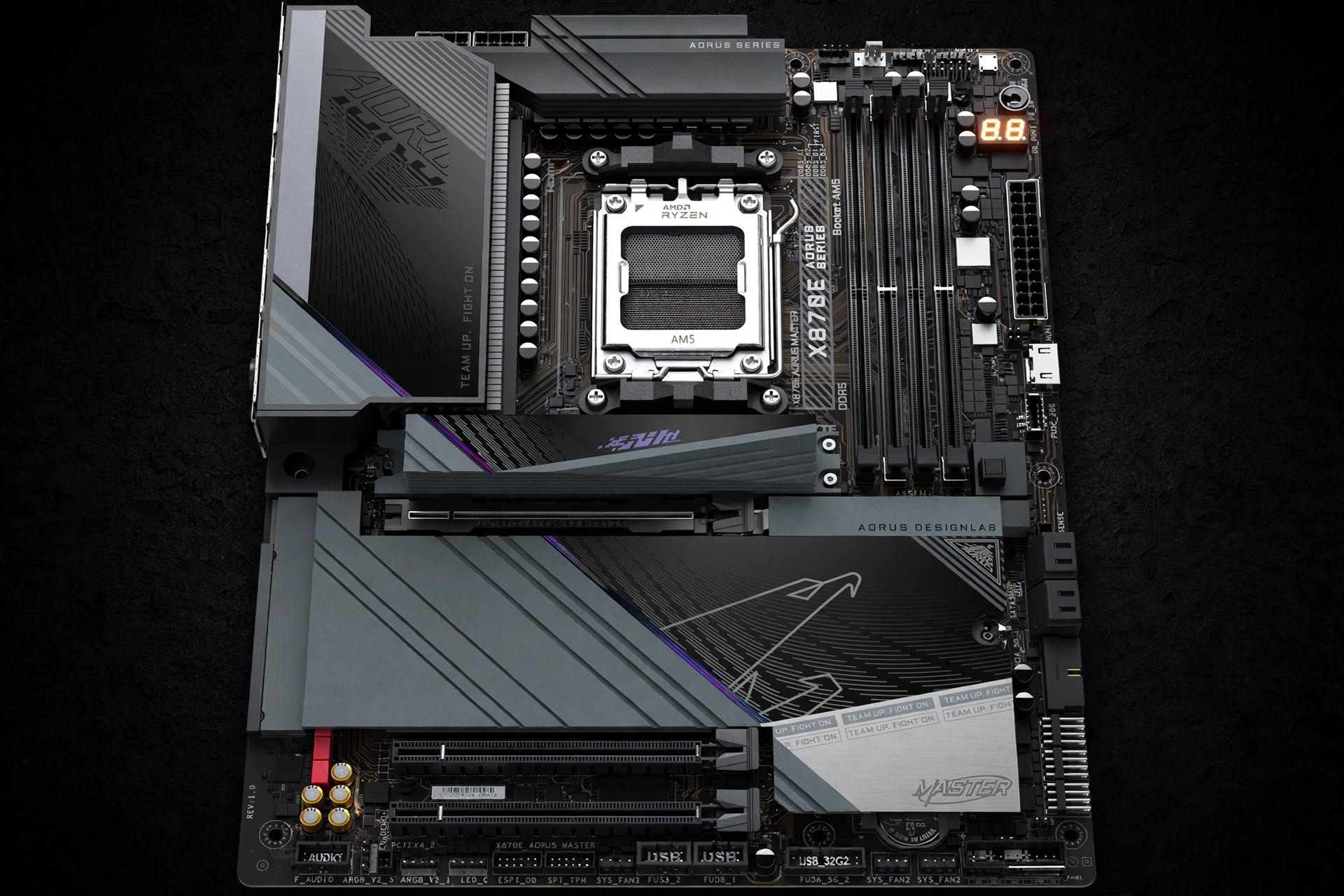
The motherboard is the computer's nervous system. It is responsible for interconnecting all components, distributing power, managing communication between the processor, memory, storage, and peripherals, and coordinating the data flow that brings software to life. It is the board where the logic resides that transforms electrical energy into processable information.
This article examines the motherboard from its origins to the most recent innovations. We will begin with the first modern motherboard, the Planar Breadboard of the IBM PC 5150 (1981), and then examine the fundamental components that make up any contemporary motherboard. Next, we will focus on AMD's X870/X870E series, the latest generation of boards for the AM5 socket available as of September 2026. Finally, we will explore the most recent innovations, present a comparative table with some of the most iconic boards in history, and offer a poll for readers to choose their favorite.
1. The Origin: The Planar Breadboard of the IBM PC 5150
On August 12, 1981, IBM introduced the world to the IBM Personal Computer 5150. This machine, which cost $1,565, was not only a commercial success but also established the industry standard for the modern PC. Before its arrival, each manufacturer used its own proprietary designs and architectures. The IBM PC 5150, being an open design, allowed any manufacturer to create compatible components, ushering in the era of the PC as we know it.
The motherboard of this machine was named by IBM as the "Planar" or "breadboard". It was a basic but functional design that contained the essential elements for the computer to work. Among its components were:
- Intel 8088 processor at 4.77 MHz.
- RAM memory: the base unit came with 16 KB, expandable up to 640 KB.
- ISA (Industry Standard Architecture) 8-bit expansion slots, which allowed connecting additional cards.
- Ports for keyboard and cassette tape.
The Planar Breadboard, created by IBM's engineering team led by Don Estridge and William C. Lowe, established the concept of the motherboard as the central component that interconnects the processor, memory, and peripherals. It was the starting point of an evolution that, 45 years later, has led us to the sophisticated motherboards we know today.
2. Anatomy of a Modern Motherboard: Essential Components
Despite the enormous technological evolution, a modern motherboard shares the same fundamental principles as the 1981 Planar Breadboard. The components have changed, become more complex, and increased in number, but their function remains the same: to connect, power, and communicate.
Below are the essential components of any contemporary motherboard.
2.1. The Socket
The socket is the physical connector where the processor (CPU) is installed. It is the starting point for all system communication. Each socket is designed for a specific family of processors and is not interchangeable with others. Current sockets, such as AMD's AM5, use a land grid array (LGA) system with pins on the board rather than on the processor.
2.2. The Chipset
The chipset is the "conductor" of the motherboard. It is a set of integrated circuits that manages communication between the processor and the rest of the components: RAM memory, expansion slots, storage ports, and peripherals. On modern boards, the chipset usually consists of a single chip (the southbridge), as the northbridge (which managed memory and PCIe) has been integrated into the processor itself.
2.3. The VRM (Voltage Regulator Module)
The VRM is responsible for supplying the necessary power to the processor and other critical components, transforming the 12V coming from the power supply into the precise voltages required by the CPU (typically between 1V and 1.5V). A VRM is composed of several elements:
- PWM Controller: the brain of the VRM, which regulates the power phase.
- Mosfets: transistors that act as switches to control the flow of current.
- Chokes (Inductors): store energy and smooth the current, preventing spikes.
- Capacitors: filter electrical noise and stabilize voltage.
The quality of the VRM, measured by the number of phases (e.g., 18+2+1) and the capacity of the components (measured in amperes), is crucial for system stability, especially in overclocking situations or under intensive workloads.
2.4. Expansion Slots (PCIe)
PCI Express (PCIe) slots are the connectors that allow adding expansion cards, such as graphics cards, network cards, or storage controllers. The current version is PCIe 5.0, which doubles the bandwidth of the previous generation.
2.5. Memory Slots (DIMM)
DIMM (Dual In-line Memory Module) slots are where RAM memory modules are installed. The current technology is DDR5, which offers higher speed and energy efficiency than the previous generation, DDR4.
2.6. Storage Connectors (M.2 and SATA)
- M.2: a compact connector for solid-state drives (SSDs) that uses the PCIe bus to offer very high transfer speeds.
- SATA: an older connector for hard disk drives (HDDs) and SSDs, operating at lower speeds than M.2.
2.7. Power Connectors
- 24-pin ATX: the main connector that supplies power to the motherboard.
- 8-pin EPS (or 4+4): supplies additional power to the processor.
2.8. BIOS/UEFI
The BIOS (Basic Input/Output System) or its modern successor, the UEFI (Unified Extensible Firmware Interface), is the firmware that runs when the computer is turned on. Its function is to initialize the hardware and load the operating system. Modern boards use a flash memory chip (such as the 64 MB one on X870E boards) to store the firmware.
2.9. I/O Ports
On the rear of the board are the input/output ports: USB, Ethernet, audio, video, etc. X870/X870E boards include USB4, which offers speeds of up to 40 Gbps.
Diagram of a Modern Motherboard
flowchart TD
    A["CPU Socket (AM5)"] --> B["CPU"]
    B --> C["Chipset (X870E)"]
    B --> D["DIMM Slots (DDR5)"]
    B --> E["PCIe 5.0 Slots (GPU)"]

    C --> F["M.2 Slots (SSD)"]
    C --> G["SATA Connectors"]
    C --> H["USB/Network/Audio Ports"]

    I["VRM (18+2+1 phases)"] --> B
    J["ATX Connector (24-pin)"] --> I
    K["EPS Connector (8-pin)"] --> I

    style A fill:#f9f9f9,stroke:#333,stroke-width:2px
    style C fill:#e1f5fe,stroke:#0288d1,stroke-width:2px
    style I fill:#fff3e0,stroke:#ef6c00,stroke-width:2px
3. The X870/X870E Series: The Latest Generation (September 2026)
In the current market, AMD's X870/X870E series represents the cutting edge in motherboards for the AM5 socket, compatible with Ryzen 7000, 8000, and 9000 series processors. Launched in early 2026, this generation is an evolution of the X670E/X670 series, introducing significant improvements in connectivity and standardization.
3.1. Differences Between X870E and X870
The main difference between the X870E (Extreme) and X870 (without "E") chipsets lies in the number of PCIe lanes and ports available.
| Feature | X870E | X870 |
|---|---|---|
| Chipset | Two Promontory 21 dies | One Promontory 21 die |
| PCIe 5.0 Lanes (max.) | 24 | 24 |
| PCIe 4.0 Lanes (max.) | 12 | 8 |
| PCIe 3.0 Lanes (max.) | 8 | 4 |
| USB4 (40 Gbps) | Standard (2 ports) | Standard (1 port) |
| USB 10 Gbps (max.) | 12 | 6 |
| SATA (max.) | 8 | 4 |
In essence, the X870E offers double the number of high-speed USB and SATA ports compared to the X870, making it the ideal choice for users who need a large number of connected devices. In terms of graphics and storage performance (PCIe 5.0), both chipsets offer the same capabilities, as the processor provides 24 PCIe 5.0 lanes directly.
3.2. Common Features of the X870/X870E Series
All models based on these chipsets share a series of cutting-edge features:
- Standard USB4: unlike the previous generation, where it was optional, USB4 is mandatory, guaranteeing transfer speeds of up to 40 Gbps. Some boards include two USB4 ports.
- PCIe 5.0: all X870/X870E boards offer PCIe 5.0 support for both the main graphics slot and at least one M.2 slot.
- DDR5: support for high-speed DDR5 memory, reaching frequencies of up to 9000 MT/s or more on some models.
- Wi-Fi 7 and Bluetooth 5.4: next-generation wireless connectivity is standard on these models.
- High-capacity VRM: top-tier models incorporate 18+2+1 phase VRMs with 110A components, capable of handling the power demands of the most powerful Ryzen processors.
3.3. Notable Models on the Market
Manufacturers such as MSI, ASRock, GIGABYTE, and ASUS have launched a wide range of X870/X870E boards, with prices ranging from $229 to over $820.
- MSI MEG X870E ACE MAX: MSI's flagship, with an 18+2+1 phase VRM, support for DDR5-9000, and dual 10GbE and 5GbE network connectivity, priced at around $820.
- MSI PRO X870E-S EVO WIFI: a more affordable option within the X870E range, with a 12+2+1 phase VRM and a price around $235.
- ASRock X870E Challenger WIFI White: a very complete board for around $229, offering USB4, PCIe 5.0, and an attractive design.
- GIGABYTE X870E AERO X3D DARK WOOD: a board with a unique design that mimics dark wood, aimed at aesthetic builds with a premium finish, priced at $499.
- ASUS ROG Crosshair X870E Glacial: a high-end ASUS model with an advanced 24+2+2 phase VRM design, support for DDR5 8000+ MT/s, and a 5-inch LCD display, priced at around $1,450.
4. The Greatest Innovation in Motherboards: Integrated Artificial Intelligence
If there is one innovation that is making a difference in 2026 motherboards, it is the integration of artificial intelligence (AI) into the hardware and firmware. This technology, which was once the exclusive domain of software, is now becoming a fundamental component of the board itself.
GIGABYTE has been one of the pioneers in this field with its X3D Turbo Mode 2.0 technology, an AI-assisted overclocking system. This mode analyzes the processor's characteristics and workload in real time to automatically adjust frequencies and voltages, optimizing performance without manual user intervention.
But AI goes beyond overclocking. It is also used for:
- Signal integrity optimization: AI algorithms analyze the PCB design to improve signal quality and reduce interference in the circuit layers.
- Advanced thermal management: AI controls fans and adjusts speed curves to intelligently keep temperatures under control.
- BIOS optimization: UEFI interfaces now include AI assistants that help users configure the system and troubleshoot issues.
In summary, AI is turning motherboards into self-optimizing systems, offering maximum performance and unprecedented stability without requiring advanced technical knowledge from the user.
Power System Flow Diagram
flowchart LR
    subgraph Power Supply
        A[12V] --> B[24-pin ATX connector]
        A --> C[8-pin EPS connector]
    end

    subgraph Motherboard
        B --> D[VRM]
        C --> D
        D --> E[PWM Controller]
        E --> F[Mosfets]
        F --> G["Chokes (Inductors)"]
        G --> H[Capacitors]
        H --> I[CPU Socket]
        I --> J[Processor]
    end

    style A fill:#f9f9f9,stroke:#333
    style D fill:#fff3e0,stroke:#ef6c00
    style I fill:#e3f2fd,stroke:#1565c0
5. Comparative Table: Evolution of Motherboards (1981 - 2026)
To appreciate the magnitude of the evolution, it is useful to compare the specifications of the first motherboard with those of a modern high-end board.
| Feature | IBM PC 5150 Planar (1981) | Modern X870E Board (2026) |
|---|---|---|
| Socket / CPU | Intel 8088 @ 4.77 MHz | AMD AM5 (Ryzen 9000/8000/7000) |
| RAM Memory | 16 KB - 640 KB | DDR5, up to 256 GB, >9000 MT/s |
| Chipset | Simple, integrated on the board | X870E (two chips) / X870 |
| VRM (Phases) | Simple, no advanced regulation | 18+2+1 phases with 110A SPS |
| Expansion Slots | ISA 8-bit | PCIe 5.0 x16, PCIe 5.0 x4, etc. |
| Storage | Floppy disk drive | M.2 PCIe 5.0, SATA 6Gb/s |
| Connectivity (Network) | Not available | 10GbE / 5GbE LAN, Wi-Fi 7, BT 5.4 |
| USB Ports | Not available | USB4 (40 Gbps), USB 10/5 Gbps |
| BIOS | Basic ROM | 64 MB UEFI Flash ROM |
| Form Factor | Custom | ATX, Mini-ITX |
| Price | $1,565 (complete PC) | $229 - $820+ (board only) |
6. Motherboards That Made History: The Poll
Throughout history, there have been motherboards that earned a special place in the hearts of enthusiasts. Some for their overclocking capability, others for their reliability, and many for marking a before and after in the industry.
6.1. Abit BH6 (1998)
This Socket 370 and Slot 1 board, based on the Intel 440BX chipset, is considered one of the best boards in history. It was famous for its jumperless overclocking capability, allowing users to squeeze the most out of Intel Celeron and Pentium II/III processors. Its legacy endures as a symbol of the golden age of overclocking.
6.2. DFI LanParty UT NF4 Ultra-D (2005)
This Socket 939 board for AMD Athlon 64 processors, based on the NVIDIA nForce4 Ultra chipset, was the king of overclockers. Its design, intended for extreme overclocking, and its ability to be modified to enable SLI support (which it officially lacked) made it a legend.
6.3. ASUS Maximus Formula / Rampage (LGA 775 / X58)
This ASUS series, part of the Republic of Gamers (ROG) family, marked a milestone in the enthusiast board market. The models for LGA 775 and X58 (LGA 1366) offered unprecedented performance and overclocking features. The Rampage series, in particular, with its Intel X58 chipset and support for first-generation Core i7 processors, laid the foundation for the high-end gaming boards we know today.
6.4. MSI Z97 Gaming 5 (2014)
This board for Socket LGA1150 and 4th and 5th generation Intel processors, based on the Intel Z97 chipset, was a success in the mid-to-high-end gaming segment. It offered an excellent balance between price and performance, with support for PCIe 3.0, M.2, and multi-GPU configurations.
Poll: What is your favorite historic motherboard?
After this historical and technical journey, we want to know your opinion. Which of these motherboards that marked an era do you think is the best?
7. Conclusion
The motherboard has come a long way from the modest Planar Breadboard of the IBM PC 5150. What began as a simple board with a processor, some memory, and expansion slots has transformed into an engineering masterpiece, with hundreds of components, complex circuit layers, and processing power that far exceeds the supercomputers of a few decades ago.
AMD's X870/X870E series is the latest link in this evolutionary chain. It offers next-generation connectivity like USB4 and PCIe 5.0, unprecedented power management with high-phase VRMs, and the integration of artificial intelligence to automatically optimize performance. It is the result of decades of innovation and fierce competition among manufacturers that has benefited end users.
However, it is important to remember that technology does not exist in a vacuum. Behind every motherboard are stories of engineers, enthusiast communities, and moments that defined the industry. Boards like the Abit BH6, the DFI LanParty UT NF4 Ultra-D, the ASUS Maximus Formula, or the MSI Z97 Gaming 5 are not just components; they are testimonies to an era, a shared passion for technology.
8. References
- IBM PC 5150 and the Planar Breadboard: Droid4X. (2026). History Of Motherboards: From 1981 to Present Day Evolution. Details the history of the "Planar Breadboard", introduced by engineer Patty McHugh for IBM in 1981 as the starting point for commercial motherboards [cite: 1.1.2]. Available at: https://droid4x.com/history-of-motherboards/
- Motherboard Components (VRM, Chipset, etc.): Rodrigo, M. (2026). Motherboard: Evolution and Modern Technology. Presentation exploring the evolution and essential anatomy of motherboards [cite: 1.1.1]. Available at: https://prezi.com/p/ya5dovm7gn7f/motherboard-evolution-and-modern-technology/
- AMD X870/X870E Chipset Specifications: ASUS. (2026). TUF GAMING X870E-PLUS WIFI7 Tech Specs. Official specifications of the X870E chipset, detailing the distribution of PCIe 5.0 lanes, support for DDR5 memory at 8000+ MT/s and standards such as USB4 [cite: 1.2.2]. Available at: https://www.asus.com/es/motherboards-components/motherboards/tuf-gaming/tuf-gaming-x870e-plus-wifi7/techspec/
- MSI X870E/X870 Motherboards: MSI Latin America. (2026). The Best AM5 Motherboard for AMD Ryzen 9000 X3D Processor. Official documentation for the MEG X870E ACE MAX, PRO X870E-S EVO models and the MAG TOMAHAWK line for enthusiasts [cite: 1.3.1]. Available at: https://latam.msi.com/Landing/amd-am5-x870e-x870-b850-b840-ryzen-9000-x3d-best-ai-gaming-motherboard
- GIGABYTE X870E/X870 Motherboards: GIGABYTE. (2026). Motherboard GIGABYTE X870E AORUS ELITE WiFi 7 ICE. Technical details of Gigabyte variants for the AM5 socket, emphasizing 2.5 GbE LAN and Wi-Fi 7 support [cite: 1.4.1]. Available at: https://enjoyvideogames.com.co/product/motherboard-gigabyte-x870e-aorus-elite-wifi-7-ice-socket-am5-atx/
- AI Innovations in Motherboards: MSI. (2026). New MSI X870(E) Motherboards – Designed to Dominate Next-Generation AI Computing. Addresses modern artificial intelligence implementations integrated into the motherboard such as AI LAN Manager and Frozr AI Cooling [cite: 1.3.1]. Available at: https://latam.msi.com/Landing/amd-am5-x870e-x870-b850-b840-ryzen-9000-x3d-best-ai-gaming-motherboard
- Abit BH6 Specifications: ABIT Computer Corp. (1998). BH6 Pentium® II AGP Based ATX Mainboard Specifications. Historical archive of the features of the legendary motherboard for Intel Pentium II and Celeron processors with Jumperless Soft Menu II technology [cite: 2.1.3]. Available at: http://usa.abit.com.tw/html/bh6.htm
- DFI LanParty UT NF4 Ultra-D Specifications: TechPowerUp. (2005). DFI LanParty NF4 SLI-DR / Ultra-D Expert Review. Technical review of the legendary features of the DFI LanParty Socket 939 board that captivated overclockers [cite: 2.2.1]. Available at: https://www.techpowerup.com/review/dfi-lpnf4expert/
- ASUS Rampage III Formula (X58) Specifications: Vortez. (2010). ASUS Rampage III Formula Motherboard Review - Specifications. In-depth analysis of the specifications of this board belonging to the Republic of Gamers (ROG) family with LGA 1366 socket [cite: 2.3.2]. Available at: https://www.vortez.net/articles_pages/asus_rampage_iii_formula_motherboard_review,2.html
- MSI Z97 Gaming 5 Specifications: SoloTodo. (2014). MSI Z97 GAMING 5 - Features and Specifications. Summary of the LGA 1150 socket and Multi-GPU specifications of this iconic motherboard for 4th and 5th generation Intel processors [cite: 2.4.1]. Available at: https://www.solotodo.cl/products/16591-msi-z97-gaming-5
Loading reactions...
Comments (0)
Loading session...
No comments yet. Be the first to comment.